Quality
Quality Checker
Immediate component matching on the production line.
Business problem
Operators need a quick way to verify that the installed component matches the part.
My contribution
I connected the workstation hardware and configured both QR scanners.
- Hardware installation
- Scanner configuration
Solution and capabilities
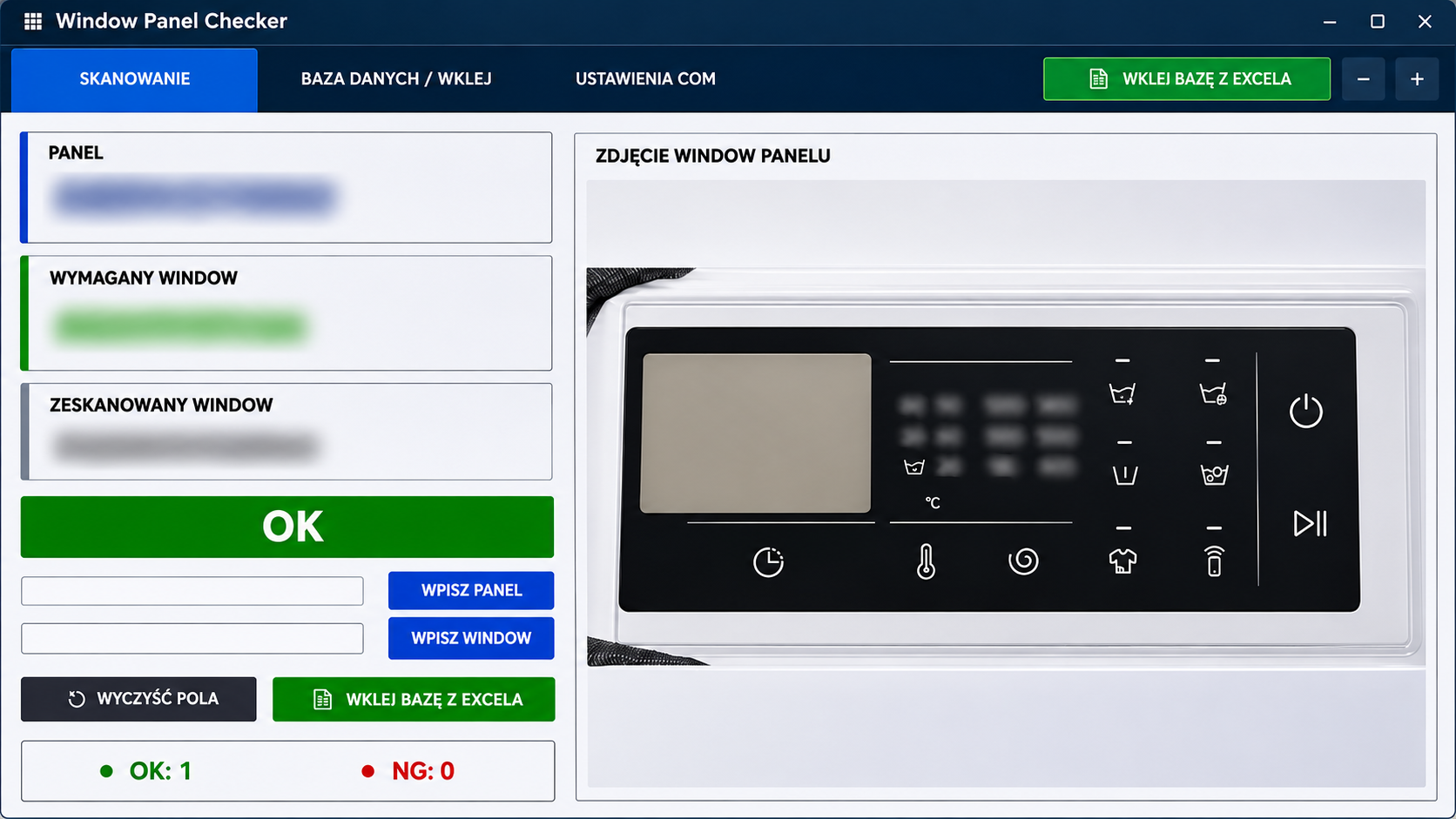
The system checks scanned components against the expected combination and displays a clear pass or fail result.
- The first scan identifies the part. The system loads its reference image and displays the required component code.
- The second scan reads the installed component and compares it with the expected code.
- The operator gets an immediate OK or NG result.
System architecture
- First scan selects the part, reference image and expected code
- Second scan reads the installed component
- Code comparison returns OK or NG
Technologies and integrations
- Databases
- Component and image database
- Hardware
- Two QR scanners
- Software and techniques
- OK / NG validation
- Integration flows
- Two scanners connected to the workstation app
Technical challenges
- Giving each scan a distinct role: one selects the part and expected code, the other verifies the installed component.
Outcomes
- A reference image and the expected code help the operator identify the correct component before assembly.
- An OK or NG result after the second scan flags a mismatch at the workstation.
Gallery